

AI Agent Additional Settings
Chat Enhancements, Nudge Settings, Data Source Display, Chat Transcript, and GDPR Compliance
This section within the AI Agent setup focuses on enhancing the overall conversation experience, improving usability, and ensuring compliance with privacy expectations. It includes multiple configuration areas that collectively determine how the AI Agent behaves during interactions, how it handles inactive users, how information transparency is managed, and how user data is treated. Each setting plays a specific role in shaping the quality, clarity, and professionalism of the AI Agent experience, so it's important to configure them thoughtfully for your use case.
Chat Enhancements
Chat Enhancements improve how conversations are presented and experienced by users. While they do not directly affect response accuracy, they significantly influence readability, engagement, and ease of interaction.
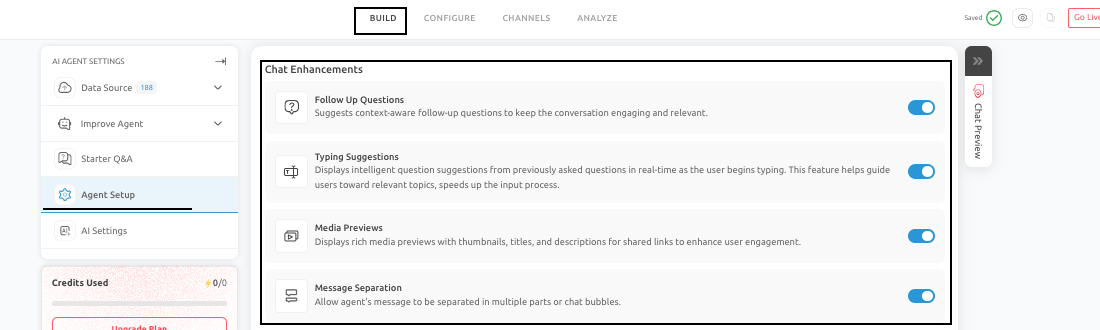
The features available under Chat Enhancements are:
-
Follow-Up Suggestions: This feature allows the AI Agent to recommend relevant next questions or actions after responding, helping guide users through the conversation and encouraging continued engagement.
-
Typing Guidance (Typing Suggestions): Typing guidance assists users as they enter queries by suggesting possible inputs, reducing effort, and helping them ask clearer questions.
-
Media Previews: When links are shared, media previews display visual summaries or thumbnails, making responses more engaging and easier to understand.
-
Message Separation: This feature breaks long responses into smaller chat bubbles, improving readability and making detailed answers easier to follow.
Best Practices
- Enable enhancements that improve clarity and usability without making the interface feel cluttered.
- For content-heavy or support-driven use cases, readability features are especially valuable, while for simple transactional flows, a minimal setup is often more effective.
Nudge Settings
Nudge Settings control how the AI Agent responds when a user becomes inactive during a conversation. This feature allows you to define:
- When the AI Agent should check if the user is still present
- How long should it wait between inactivity messages
- Whether the session should close after a final message
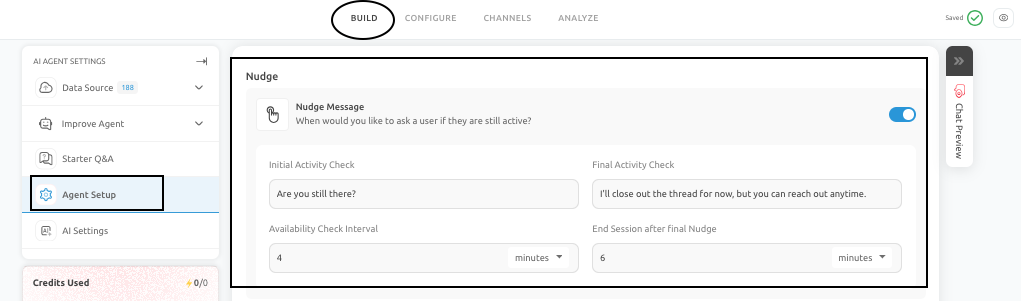
Without proper handling of inactivity, conversations may stall or end abruptly without guidance. A well-timed nudge can re-engage users and help them complete their intended action, while overly frequent nudges can feel intrusive.
Best Practices
- Use polite and neutral language for nudges, maintain a reasonable interval between reminders, and align the behavior with the type of interaction.
- For structured flows such as lead capture or scheduling, nudges can help improve completion rates.
Data Source Display
Data Source Display determines whether the AI Agent shows users where its responses are derived from. This feature is particularly useful when transparency is important, such as:
- Help center or documentation-driven use cases
- Policy or compliance-related queries
- Research or information-heavy interactions

The benefits of using this feature are:
- Builds trust by showing the origin of information
- Helps users verify responses independently
- Reduces repeated clarification questions
Best Practices
- Displaying sources is not necessary for every use case. In guided flows such as lead generation or promotions, it may add unnecessary visual complexity.
- Enable this feature when it improves clarity and confidence for the user. If the priority is speed and simplicity, it is better to keep the interface clean.
Chat Transcript
Chat Transcript allows the AI Agent to send a copy of the conversation to the user, typically via email. This feature is valuable when users need to refer back to information later, such as:
- Support instructions
- Appointment details
- Process explanations
- Policy or compliance-related conversations

Benefits of using this feature includes:
- Provides users with a reliable reference
- Supports follow-up actions and continuity
- Helps internal teams with escalations or reviews
Best Practices
- Ensure that email collection is properly configured, privacy expectations are clearly handled and the conversation content is structured and understandable outside the chat interface.
- Enable transcripts when conversations contain meaningful or actionable information that users are likely to revisit.
GDPR Compliance
GDPR Compliance settings help ensure that the AI Agent aligns with data privacy expectations and regulatory requirements. This section may include:
- Cookie consent notifications
- Privacy policy display
- User data disclosure controls
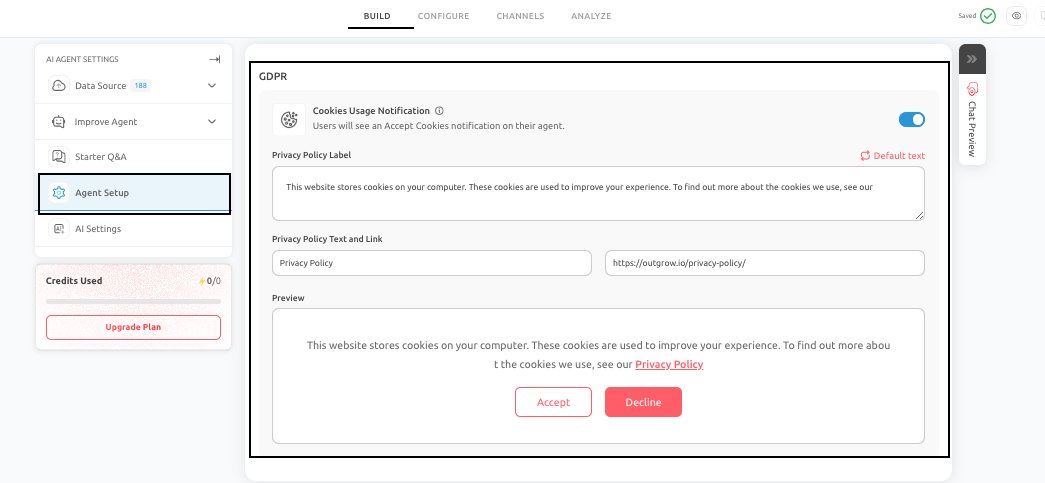
AI Agents often collect or process user information. Clear communication about how data is handled builds trust and reduces potential privacy concerns.
Best Practices
- Align settings with your organization’s privacy policies
- Ensure consistency between chatbot behavior and legal documentation
- Review compliance settings whenever new data collection or integrations are added
Conclusion
The Chat Enhancements, Nudge Settings, Data Source Display, Chat Transcript, and GDPR Compliance sections collectively ensure that your AI Agent delivers a smooth, user-friendly, and trustworthy experience. Proper configuration of these settings enhances usability, maintains engagement, and aligns the AI Agent with both business objectives and user expectations.
Feel free to use our chat tool on the bottom right or reach out to us at [email protected] if you have any questions, and our team can help you with a quick solution.
Updated 6 months ago