

Managing And Creating Attributes In Your AI Agent
The Attributes system is a core component of your AI Agent, enabling it to collect, store, and reuse structured user data throughout conversations. Attributes act as the memory layer of your AI Agent, allowing it to move beyond simple question and answer interactions and support real business workflows.
By using attributes effectively, you can personalize responses, qualify leads, trigger integrations, and ensure that important user information is consistently captured and utilized across your system.
What Attributes are Used For
Attributes allow your AI Agent to capture and use structured data in a meaningful way. They are commonly used to:
- Store user details such as name, email, and phone number
- Capture qualification data such as budget, company size, or timeline
- Support workflows like appointment booking or verification processes
- Personalize chatbot responses based on user input
- Pass structured data into integrations and API requests
- Improve reporting, segmentation, and analytics
Without attributes, your AI Agent can still respond to queries, but it becomes difficult to maintain consistency, personalization, and automation across conversations.
How Attributes Work in Practice
When a user provides information during a conversation, that data can be mapped to a specific attribute. Once stored, the attribute can be reused in multiple ways:
- Referenced in later responses for personalization
- Included in lead or user profiles
- Passed to external systems through integrations or APIs
- Used as a condition in conversation logic
- Included in analytics and reporting
- For example, if a user shares their company size, the AI Agent can store it as an attribute and later tailor responses or route the lead based on that information.
When to Use Attributes
Attributes should be used whenever your AI Agent needs to support workflows that go beyond simple Q&A. Common use cases include:
- Qualifying leads before sending them to a CRM
- Collecting appointment or intake details in healthcare workflows
- Verifying users in HR or internal systems
- Capturing structured data for support or escalation flows
- Gathering segmentation data for marketing or sales
Real Business Use Cases
- SaaS Lead Qualification: A SaaS company configures its AI Agent to ask users about team size, current tools, and implementation timeline. Each response is stored as an attribute and shared with the sales team, improving lead quality and reducing follow-up effort.
- Healthcare Booking Workflow: A clinic collects insurance information, appointment preferences, and reasons for the visit through the AI Agent. These details are stored as attributes and used to streamline the booking process.
- HR Support Workflow: An internal HR AI Agent collects employee ID, department, and request type. Based on these attributes, it determines whether to answer the query directly or escalate it.
Creating a New Attribute & When To Create A New Attribute
You should create a new attribute when the default fields are not sufficient for your workflow. This is especially common in industry specific use cases that require additional data. Typical scenarios include:
- Capturing custom qualification fields
- Collecting industry-specific information
- Supporting verification workflows
- Passing custom data into APIs or integrations
Where to Access Attributes
- To manage attributes, open your AI Agent and navigate to the Configure tab.
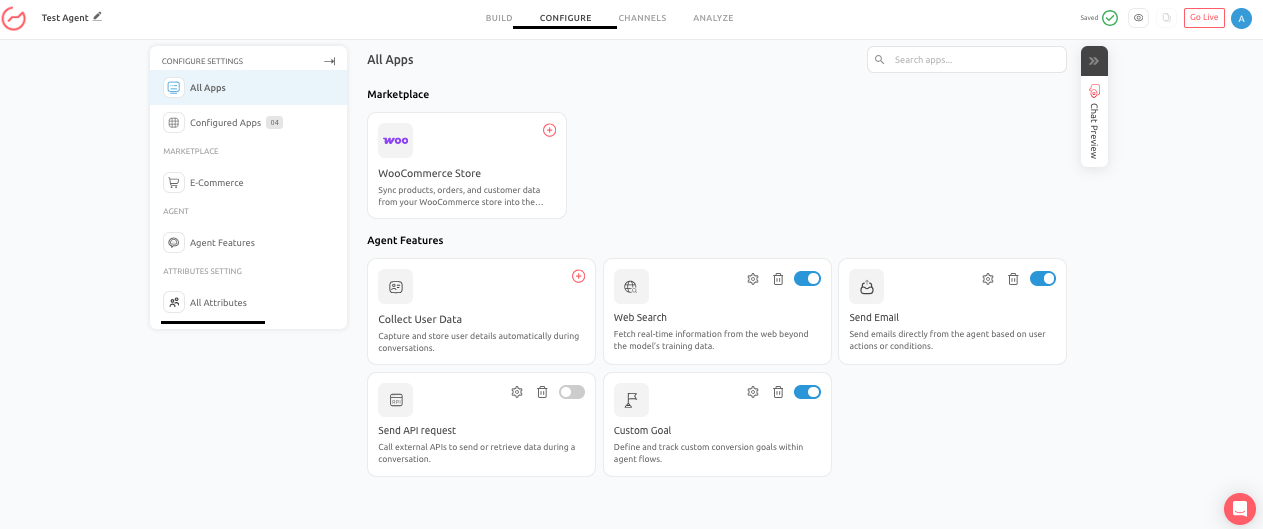
- Within this section, go to All Attributes under Attribute Settings.
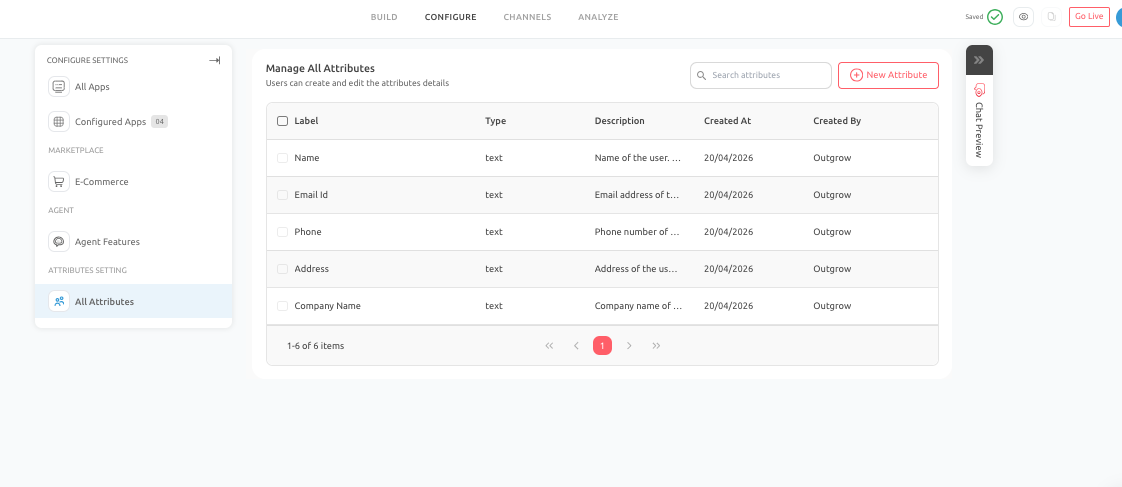
- This area provides a centralized view of all existing attributes and allows you to create, edit, and manage them as needed.
- Click on Add New Attribute to add an attribute. Make sure you click on Save to save the settings.
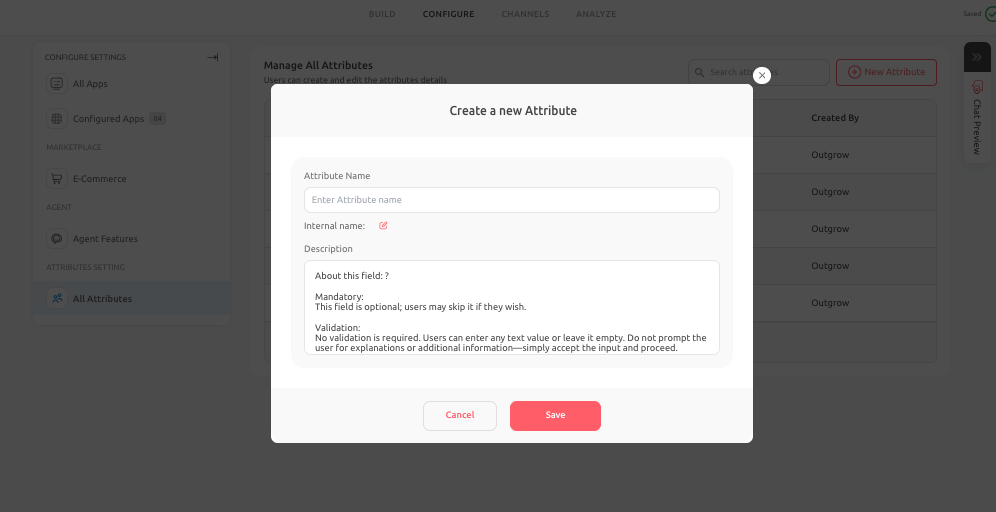
- When creating an attribute, you will define the following:
- Attribute Name: This is the display name visible in the interface. It should clearly describe the data being collected.
- Internal Name: This is the system identifier used internally. It should be consistent, lowercase, and structured with underscores.
- Description: This explains what the attribute stores and how it is used. This is especially important for team collaboration and long-term maintenance.
Best Practices to Follow
To ensure your attribute system remains effective and scalable:
- Use clear and consistent naming conventions
- Keep internal names simple and structured (e.g., lowercase with underscores)
- Collect only the data that is necessary for your workflow
- Provide meaningful descriptions for every attribute
- Avoid creating duplicate or overlapping fields
Common Mistakes to Avoid
- Creating attributes without a clear purpose
- Collecting unnecessary or overly specific data
- Using inconsistent naming conventions
- Duplicating attributes for the same use case
- Assuming attributes are being used correctly without verifying mapping
Pro Tip
If attributes are not behaving as expected:
- Check for duplicate or conflicting internal names
- Verify that the attribute is correctly mapped in the conversation flow
- Ensure the attribute is being used in integrations or actions where required
Conclusion
- The Attributes system plays a crucial role in making your AI Agent intelligent, personalized, and operationally effective.
- By carefully designing, managing, and using attributes, you can ensure that your AI Agent not only communicates effectively but also captures valuable data that supports your business processes.
Feel free to use our chat tool on the bottom right or reach out to us at [email protected] if you have any questions, and our team can help you with a quick solution.
Updated 6 months ago