

Website Chat Widget Deployment
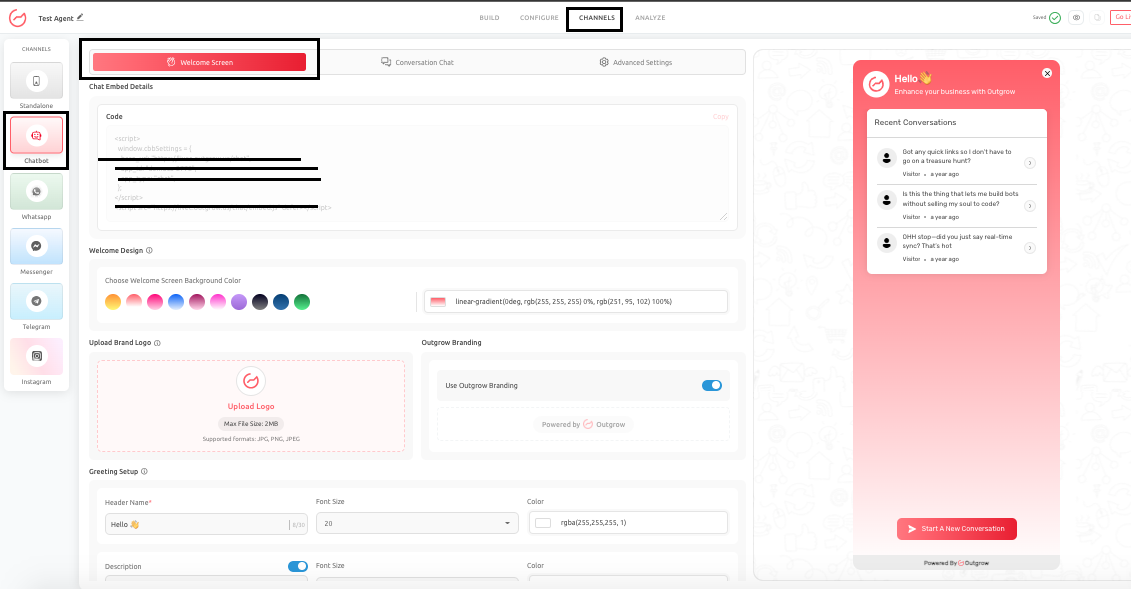
The Website Chat Widget is the most widely used deployment method for AI Agents. It allows you to embed the AI Agent directly into your website, enabling visitors to interact with it while they browse different pages.
Unlike a standalone deployment, the widget becomes part of your website experience. This means that its design, placement, trigger behavior, and messaging must align with the overall user journey. When implemented correctly, the widget enhances the browsing experience by offering timely assistance without disrupting the user’s flow.
What the Website Chat Widget Is Best For
The Website Chat Widget is particularly effective for use cases where users may need assistance while navigating your website. It is commonly used for:
- Customer support and query resolution
- FAQ automation
- Pricing page assistance
- Product recommendations
- Lead capture and qualification
- Appointment scheduling
- Onboarding guidance
Because the widget is always accessible, users can seek help at any point in their journey.
Real Business Use Cases
- SaaS Pricing Assistance: A software company embeds the AI Agent on its pricing page to help users understand plan differences, clarify billing questions, and schedule demos. This reduces confusion and helps users make faster decisions.
- E-commerce Shopping Support: An online store uses the widget to answer questions about shipping, returns, and product details. The AI Agent can also suggest products, helping users move forward with confidence during their purchase journey.
- Service-Based Inquiry Handling: A legal or financial services firm uses the widget to handle initial inquiries, gather relevant details, and guide users to book consultations. This improves lead quality and reduces manual effort.
- Support Centric Help Center: A company integrates the AI Agent within its support or help center pages to instantly answer common questions and guide users to relevant resources, reducing dependency on human support teams.
Why the Website Chat Widget Matters
Website visitors are often already engaged in a decision making process. The chat widget allows your AI Agent to assist them in real time, within the context of the page they are viewing. This makes the widget highly effective for:
- Reducing bounce rates
- Addressing user hesitation
- Answering objections at critical moments
- Improving conversion rates and lead quality
Instead of redirecting users elsewhere, the widget keeps the interaction within the existing experience.
Best Practices
To maximize the effectiveness of the Website Chat Widget:
- Ensure the widget design aligns with your website’s branding
- Configure trigger timing thoughtfully to avoid interruptions
- Use subtle and helpful messaging rather than aggressive prompts
- Customize the AI Agent experience based on the page context
- Use Starter Q&A, where users may need guidance on how to begin
- Ensure the first interaction is relevant to user intent
A well-configured widget should feel like a natural extension of your website rather than an external tool.
Common Mistakes To Avoid
- Forcing the chat to open immediately, which can feel intrusive
- Using identical messaging across all pages without context
- Ignoring visual consistency with the website’s design
- Overwhelming users with unnecessary prompts or information
Each page on your website serves a different purpose, and the AI Agent should adapt accordingly.
Conclusion
- Embedding your AI Agent as a Website Chat Widget allows you to provide real-time assistance exactly where users need it.
- When implemented thoughtfully, it enhances user experience, reduces friction, and supports conversions without disrupting the natural flow of your website.
Feel free to use our chat tool on the bottom right or reach out to us at [email protected] if you have any questions, and our team can help you with a quick solution.
Updated 6 months ago