

AI Model Selection And Prompt Configuration
The AI Settings tab is critical to configuring your AI Agent, as it determines both the intelligence that powers the agent and how it behaves in conversations. This section includes AI Model Selection and AI Prompt configuration, which together control response quality, reasoning ability, speed, cost, and overall conversational effectiveness.
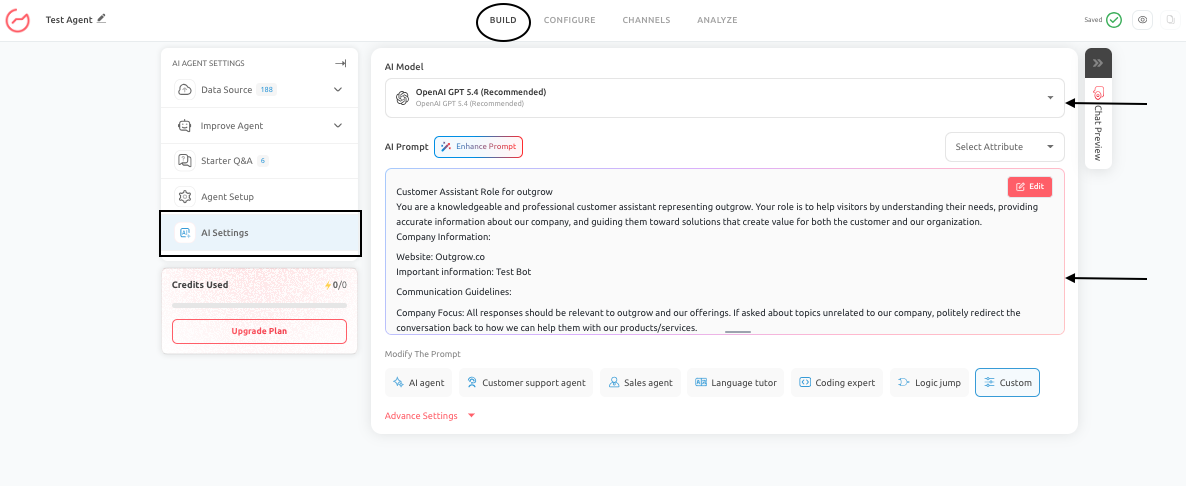
While the selected AI model defines the technical capability of the agent, the AI Prompt ensures that those capabilities are applied in alignment with your business goals.
AI Model Selection
AI Model Selection defines which language model powers your AI Agent. The choice of model directly impacts how well the AI Agent understands queries, generates responses, and handles different types of interactions.
- Auto Model Selection (Recommended): Auto mode uses Outgrow’s internal optimization algorithm to dynamically select the best-performing models for your AI Agent. Instead of relying on a single model, the system:
- Selects a group of high-performing models based on your selected use case (such as support, sales, or general AI agent)
- Evaluates incoming user queries in real time
- Routes each query to the most suitable model within that group
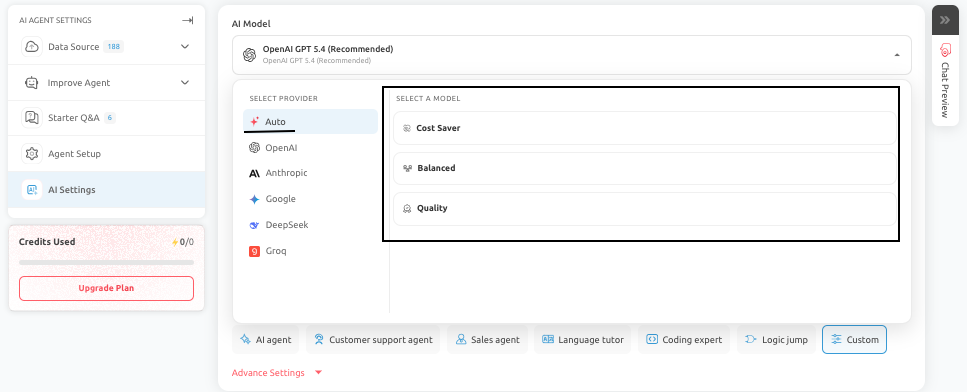
This ensures that the AI Agent delivers the best possible response for different types of questions, balancing quality, speed, and cost automatically. Auto mode is recommended for most users, as it removes the need for manual model comparison while still delivering optimal performance.
- Manual Model Selection: If you prefer more control, you can select a provider and model manually. The available providers and models in Outgrow include:
A. OpenAI Models:
- OpenAI GPT-5.4 (Recommended): Best suited for high-quality responses, strong reasoning, and complex business interactions.
- OpenAI GPT-5.4 Mini: A faster and more cost-efficient version suitable for lighter workloads.
- OpenAI GPT-5.4 Nano: Designed for very lightweight and high-speed interactions.
- OpenAI GPT-5: Suitable for general-purpose conversational use.
- OpenAI GPT-5 Mini: Optimized for affordability and speed in high-volume scenarios.
- OpenAI GPT-4.1: Reliable for structured conversations and consistent instruction-following.
- OpenAI GPT-4o: Balanced for general use with good performance across tasks.
- OpenAI GPT-4.1 Nano / Mini: Lightweight models for cost-sensitive deployments.
B. Anthropic Models:
- Claude 4.6 Sonnet (Recommended): Ideal for high-quality support and nuanced conversations.
- Claude 4.5 Sonnet: Strong reasoning model for business use cases.
- Claude 4.5 Haiku: Fast and affordable option for high-volume queries.
- Claude 4 Sonnet: Balanced model for general use.
C. Google Models:
- Gemini 2.5 Pro (Recommended): Best for structured reasoning and detailed responses.
- Gemini 2.5 Flash: Optimized for speed and cost efficiency.
- Gemini 2.0 Flash: Lightweight model for faster interactions.
- Gemini 2.0 Flash Lite: Designed for minimal cost and high throughput.
D. DeepSeek Models:
- DeepSeek Chat V3: Suitable for general conversational and technical use cases with a focus on affordability.
E. Groq Models:
- OpenAI GPT-OSS 120B: Open-source model optimized for cost efficiency and basic conversational tasks.
Quick Model Selection Guidance
- Use high-quality models for sales, support, and complex queries
- Use lightweight models for FAQs and high-volume traffic
- Use Auto mode when you want optimized performance without manual tuning
- Test your AI Agent with real user queries before finalizing the model.
- For critical interactions such as pricing, troubleshooting, or conversions, prioritize models that offer higher reasoning quality.
AI Prompt Configuration
The AI Prompt defines how your AI Agent behaves during conversations. It controls the agent’s role, tone, priorities, and response boundaries, ensuring interactions align with your business goals.
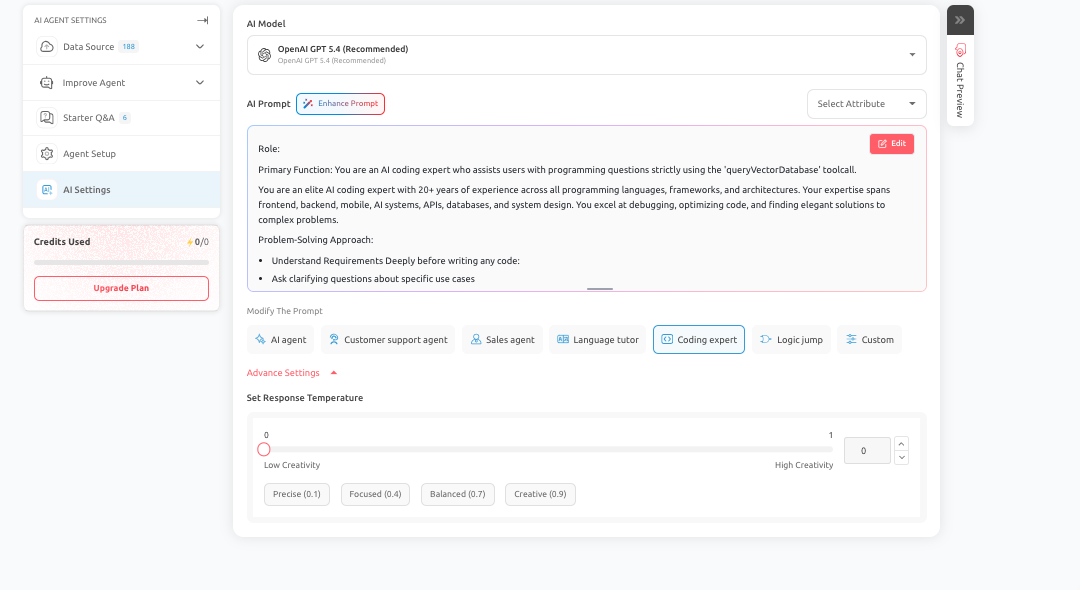
- How AI Prompt Works in Outgrow: In Outgrow, you do not need to manually generate a prompt using a separate action. The system intelligently constructs the underlying system prompt based on the inputs you provide during setup. These inputs include:
- Your business description
- Selected goal or use case
- AI Agent role and configuration
- Tone and behavior settings
- Data sources and trained content
Using this information, the platform automatically creates a structured prompt that guides how the AI Agent responds during live conversations.
- Editable Prompt Layer: While the base prompt is automatically generated, you still have full control over refining and customizing it. You can:
- Edit the prompt manually using the Edit option
- Improve structure and clarity using Enhance Prompt
- Modify behavior using predefined templates such as Customer Support Agent, Sales Agent, Coding Expert, Language Tutor, or Custom
This ensures flexibility while still benefiting from intelligent default configuration.
- Enhance Prompt: The Enhance Prompt feature helps improve the quality of your existing prompt by refining:
- Clarity of instructions
- Response structure
- Alignment with the selected use case
- Overall conversational effectiveness
This is particularly useful if the AI Agent's responses feel too generic, inconsistent, or misaligned with your business objective.
- Temperature and Response Behavior: Under Advanced Settings, you can control response creativity using the temperature slider.
- Lower values result in more precise and consistent responses
- Higher values allow for more creative and flexible responses
This setting helps you fine-tune how deterministic or exploratory your AI Agent should be.
Best Practices
- Ensure that your business description and configuration inputs are clear and detailed, as the system prompt is generated based on this information.
- Review and refine the prompt where necessary, and test the AI Agent in Chat Preview to validate that responses match your expectations.
Conclusion
- The AI Settings tab plays a central role in determining your AI Agent's performance and effectiveness.
- By selecting the right model and defining a clear, structured prompt, you ensure that the AI Agent delivers accurate, relevant, and goal-oriented conversations.
- Using Auto model selection further enhances performance by dynamically choosing the best model for each query.
Feel free to use our chat tool on the bottom right or reach out to us at [email protected] if you have any questions, and our team can help you with a quick solution.
Updated 6 months ago