

Using Send Email Action To Send Email Notifications
The Send Email action allows your AI Agent to send notification emails based on specific conversation outcomes. This feature is particularly useful for ensuring that important interactions, such as new leads, support requests, or escalation scenarios, are communicated to the appropriate internal teams in a timely manner.
By using this feature, you can connect chatbot interactions directly to your operational workflows, ensuring that no critical user request goes unnoticed.
What This Feature Is Best For
The Send Email action is most effective in scenarios where internal teams need to be notified or prompted to take action. Common use cases include:
- Notifying sales teams about new leads
- Forwarding contact or inquiry form submissions
- Alerting support teams about unresolved issues
- Sending escalation alerts for urgent requests
- Informing account managers about high-intent prospects
How to Configure Send Email
To set up the Send Email action:
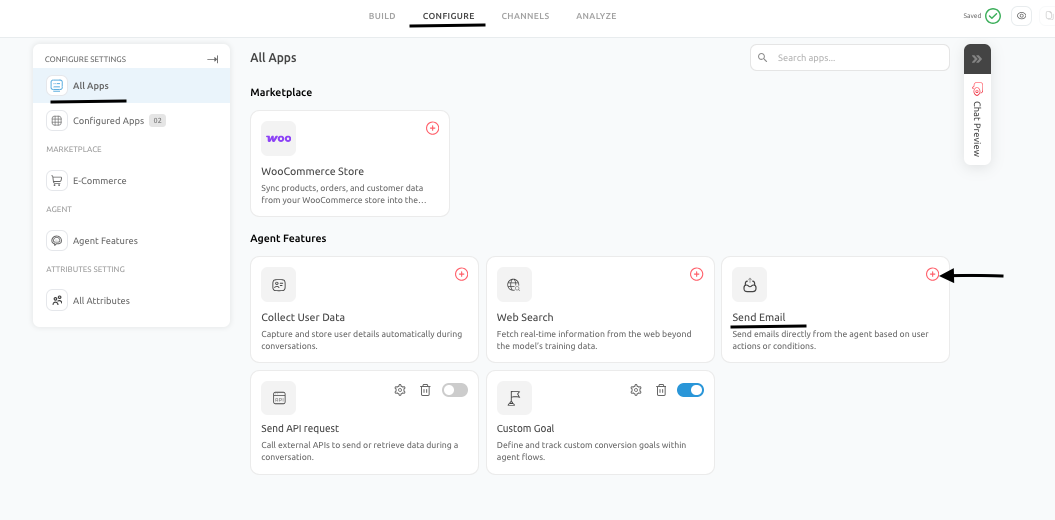
- Navigate to the Configure tab, and under Configure Settings, go to the Send Email feature under Agent Features.
- Under Send Email section, enter the recipient email address and define the subject line and email body. Also, insert dynamic variables (such as user name, email, or conversation details) where required.
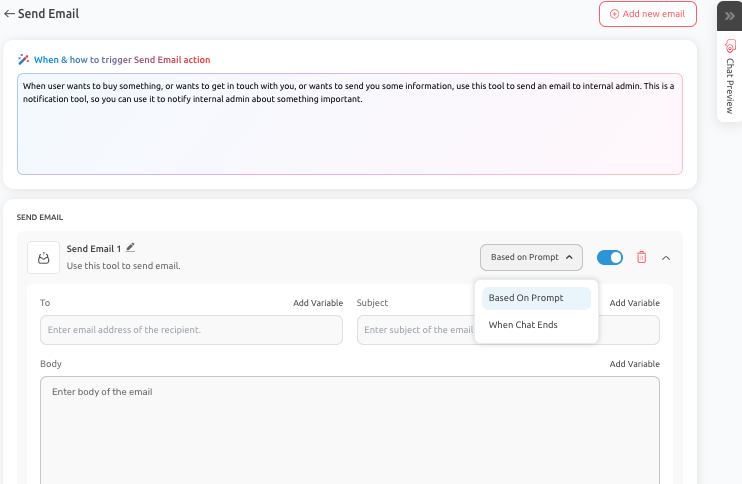
- Choose when the Email Notification will be sent. You can choose between Based On Prompt (an email will be sent once the specified condition is met) and When Chat Ends.
- Once configured, the AI Agent will trigger the email based on the conditions defined in the conversation flow.
Real Business Use Cases
- New Lead Notification: A chatbot deployed on a pricing or landing page collects lead information such as name, email, company, and requirements. Once the interaction is complete, an email is automatically sent to the sales team with all relevant details, allowing them to follow up quickly.
- Urgent Support Escalation: If a user reports a critical issue, such as account access problems or payment failures, the AI Agent collects the necessary information and sends a structured email to the support team for immediate attention.
- Callback Request Workflow: A services-based business allows users to request a callback through the chatbot. The AI Agent captures the user’s contact details and preferred timing, then sends an email to the assigned team member with the complete request.
Best Practices To Follow
To ensure effective use of the Send Email feature:
- Collect all required user information before triggering the email
- Use clear and descriptive subject lines such as:
- New Demo Request from Website
- Urgent Support Escalation
- Callback Request from AI Agent
- Structure the email body so that it is easy to read and act upon
- Include relevant context such as user intent and conversation summary
Common Mistakes To Avoid
- Sending emails without sufficient or useful information
- Triggering the email before collecting all required details
- Using vague subject lines that do not clearly indicate the purpose of the email
- Creating excessive or redundant notifications that reduce their effectiveness
Conclusion
- By integrating the Send Email action into your AI Agent, you can ensure that important user interactions are seamlessly transferred to the right teams.
- This not only improves response times but also enhances the overall effectiveness of your chatbot within your business operations.
Feel free to use our chat tool on the bottom right or reach out to us at [email protected]
If you have any questions, our team can help you with a quick solution.
Updated 6 months ago