

Role Presets and Temperature Settings in AI Prompt System
The AI Prompt System includes configuration options that help define how your AI Agent behaves, communicates, and responds during conversations. Two key components within this section are Role Presets and Temperature Setting. Role Presets help you quickly establish the overall direction and purpose of your AI Agent, while Temperature Setting allows you to control how consistent or creative the responses should be. Together, these settings play an important role in shaping the quality, tone, and reliability of the conversation experience.
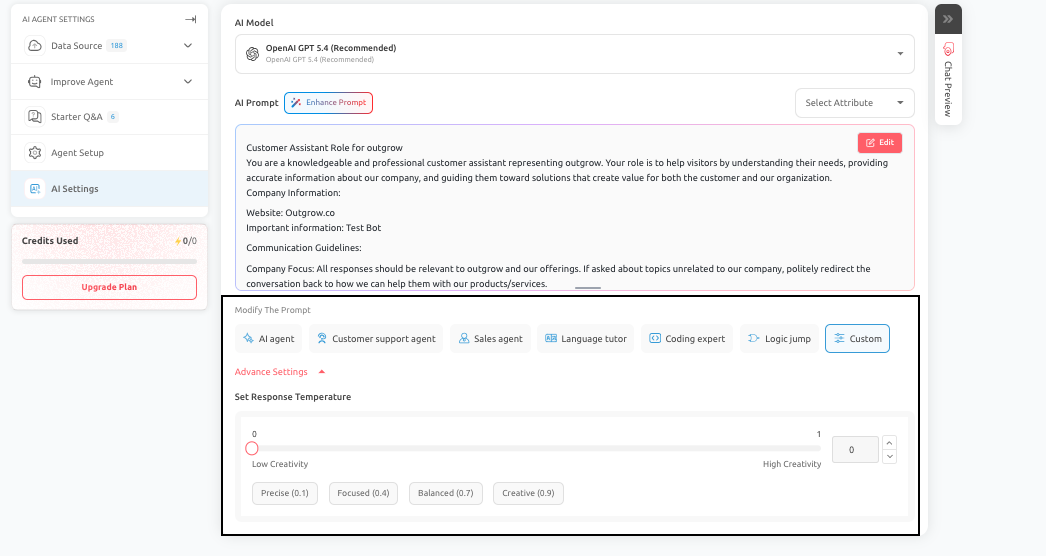
Role Presets
Role Presets provide predefined prompt structures that help you quickly set up your AI Agent for common use cases. They serve as a starting point, defining a general role and behavioral direction for the AI Agent.
- What Role Presets Are Used For: Role Presets are useful when you already know the type of AI Agent you want to build. By selecting a preset, you can reduce setup time and ensure the AI Agent starts with a structured, relevant prompt foundation. Common examples include:
- Customer support assistant
- Sales or lead generation assistant
- Onboarding guide
- Internal policy or HR assistant
- How to Use Role Presets Effectively: A Role Preset should be treated as an initial framework, not a final configuration. After applying a preset, you should:
- Review the generated prompt carefully
- Add business-specific details
- Refine instructions based on your actual workflow
- Adjust tone and behavior to match your brand
- Why Customization Is Important: While Role Presets provide a strong starting point, they cannot automatically account for:
- Your escalation rules
- Approved or restricted topics
- Specific data collection requirements
- Your brand voice and communication style
These elements must be defined manually to ensure that the AI Agent behaves correctly in real-world scenarios.
Best Practices
- Use Role Presets to accelerate setup, but always refine the prompt before publishing.
- The final performance of the AI Agent depends on how well the preset is adapted to your specific use case.
Temperature Setting
The Temperature Setting controls how predictable or creative the AI Agent’s responses are. It helps you balance consistency with flexibility in conversations.
- How Temperature Affects Behavior:
A. Lower Temperature:- Produces more consistent, predictable, and stable responses.
- This is ideal for structured interactions such as customer support, policy guidance, and data collection.
B. Higher Temperature: - Produces more varied and creative responses.
- This can be useful for exploratory or conversational scenarios, but it may reduce consistency and control.
- Choosing the Right Temperature: The appropriate setting depends on the purpose of your AI Agent:
- Use lower or moderate values when accuracy, clarity, and consistency are important.
- Use slightly higher values when the experience benefits from variation or conversational flexibility
- Testing Recommendations:
- Temperature should always be tested alongside the AI Prompt.
- Even a well-structured prompt can yield inconsistent results if the temperature is misaligned with the use case.
- Test your AI Agent using:
- Real user queries
- Edge cases
- Goal-driven interactions
This will help you identify the optimal balance between consistency and flexibility.
Best Practices
- Make small adjustments to the temperature and evaluate the impact using Chat Preview.
- Even minor changes can significantly affect how the AI Agent responds and how users perceive the conversation.
Final Recommendation
Role Presets and Temperature Setting should be configured together as part of the overall AI Prompt strategy. Role Presets define the AI Agent's direction, while the Temperature Setting controls how that direction is expressed in responses.
Conclusion
By using Role Presets to establish a strong foundation and adjusting the Temperature Setting to fine-tune response behavior, you can create an AI Agent that is both aligned with your business objectives and optimized for user experience. Careful testing and refinement of these settings will ensure consistent, high-quality interactions.
Feel free to use our chat tool in the bottom right or reach out to us at [email protected] if you have any questions; our team can help you with a quick solution.
Updated 6 months ago