

AI Agent Settings And Configuration
The Agent Settings section under the Build tab controls the core identity of the AI Agent inside the editor. These settings influence how the experience is configured internally and how the AI Agent presents itself during live conversations.
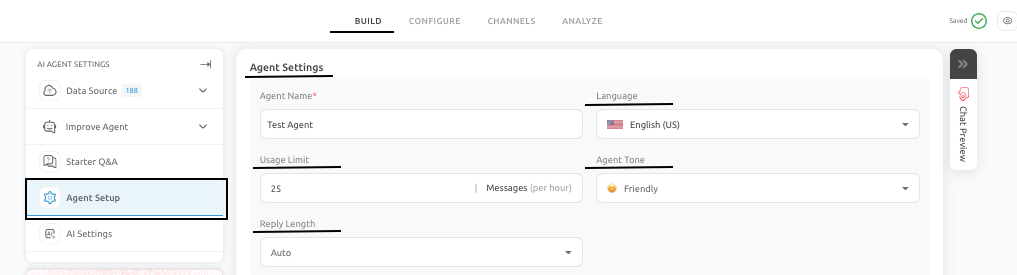
What you configure here
Under the Build tab, in Agent Settings, you typically define items such as:
- Internal AI Agent Name: This is used to identify the AI Agent within your Outgrow dashboard and helps your team manage multiple agents efficiently.
- Primary Language: This specifies the primary language the AI Agent will use when interacting with users.
- Preferred Tone: This controls the style of communication, such as professional, friendly, or conversational, to match your brand voice.
- Reply Length: This determines how detailed or concise the AI Agent’s responses will be during conversations.
These choices affect readability, audience fit, and conversational consistency. For example, a B2B support experience may benefit from a professional tone and concise replies, while an educational use case may require longer and more explanatory responses.
How these settings affect the user experience
These settings help establish expectations before a user even asks the first question. If the language and tone do not match the audience, the AI Agent can feel off-brand or difficult to trust. Similarly, if the reply length is too long for a mobile-first audience, even correct answers may feel difficult to consume.
Recommended approach
- Configure Agent Settings to match both the business context and the intended channel.
- You should also keep the trained content and the chosen language aligned wherever possible.
- If you support multiple languages, separate configurations are usually clearer than trying to combine unrelated language behavior into one experience.
- Agent Settings should be reviewed whenever the AI Agent is repurposed for a new audience, channel, or use case. Small changes in tone, language, or response style can have a meaningful impact on user perception and performance.
Feel free to use our chat tool on the bottom right or reach out to us at [email protected] if you have any questions, and our team can help you with a quick solution.
Updated 6 months ago