

Data Sources and Knowledge Training for AI Agent
The Data Sources section is a foundational part of configuring your AI Agent, as it determines what information the agent can access and use while responding to users. Instead of manually defining every response, you can train your AI Agent using structured content from websites, documents, or direct inputs.
A well-configured knowledge base ensures that the AI Agent delivers accurate, relevant, and context-aware responses. Conversely, poorly structured or outdated data sources can lead to inconsistent or incorrect answers. For this reason, selecting the right sources and maintaining them over time is essential for long-term performance.
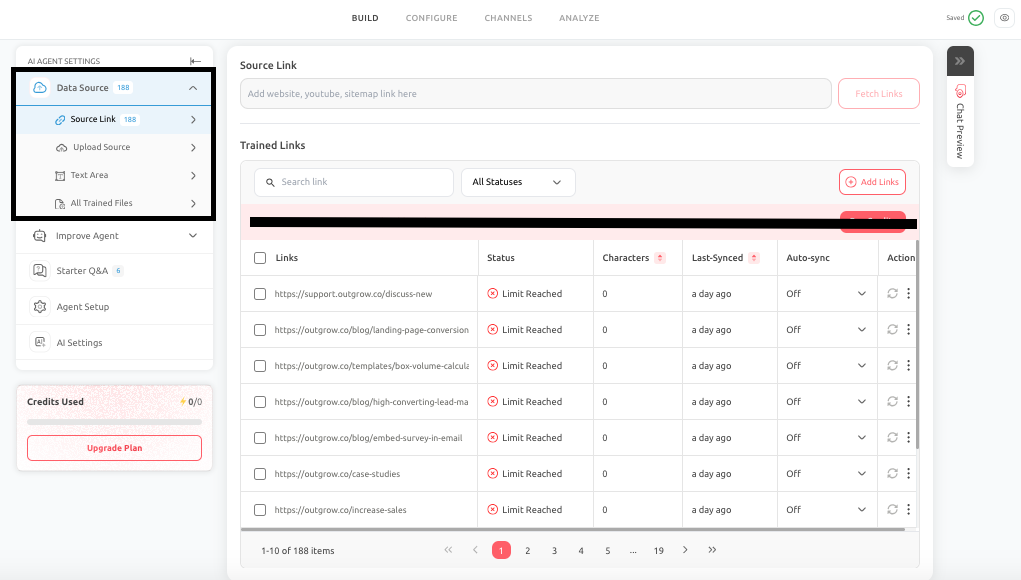
This section includes multiple training methods, each suited for different types of content and business use cases.
Data Source Options
Source Link
The Source Link feature allows you to train your AI Agent using publicly available content, including websites, help centers, landing pages, blogs, sitemap URLs, and supported video links such as YouTube. This is one of the most efficient ways to train your AI Agent, especially if your business already maintains structured content online. It ensures that the AI Agent stays aligned with the same information users see on your website.
How It Works
The workflow for Source Link is straightforward:
- Enter a website URL or sitemap URL
- Click Fetch Links to retrieve all available pages
- Review the discovered pages
- Select the relevant pages
- Click Train
- Monitor training and sync status
Once the content is processed, the AI Agent can use it as a knowledge source when answering user queries.
Understanding Link Status Options
When working with Source Link, each page or link is assigned a status. These statuses help you understand whether the content has been successfully processed, is still being handled, or requires attention. Status types include:
-
Training Complete: The content has been successfully processed and is available for the AI Agent to use.
-
In Progress: The content is currently being fetched or processed and is not yet ready for use.
-
Link Rejected / File Rejected: The system was unable to process the content, possibly due to unsupported formats, restricted access, or low-quality data.
-
Limit Reached: The system could not process additional content due to platform limits such as credit limit exhaustion, character or file constraints.
-
Re-syncing: The system is updating previously trained content to reflect changes from the source.
-
Re-sync Complete: The content has been successfully updated and reflects the latest version from the source.
-
Re-sync Failed: The system attempted to update the content but was unable to. This may happen due to broken links, permission issues, or changes in page structure.
Why These Statuses Matter
These indicators are critical for maintaining a reliable knowledge base. For example:
- A failed sync may result in outdated answers
- A rejected link may indicate missing or inaccessible content
- An in-progress state may explain why the AI Agent is not yet using certain data
Regularly reviewing these statuses ensures that your AI Agent is always working with accurate and up-to-date information.
Auto-Sync and Its Importance
Source Link supports Auto-Sync, allowing you to update content at regular intervals, such as weekly or monthly. This is particularly important for:
- Pricing pages
- Product features
- Help center articles
- Frequently updated content
Without syncing, your AI Agent may continue using outdated information even after your website has changed.
Best Practices To Follow & Common Mistakes To Avoid
1. Best Practices To Follow:
- Focus on high-value, user-facing pages
- Use sitemap imports for larger websites, but always review selections
- Regularly monitor link statuses and resolve failures
- Enable Auto-Sync for frequently updated content
2. Common Mistakes to Avoid:
- Training on every available page without filtering
- Including irrelevant pages such as policies or job listings
- Ignoring failed sync or rejected links
- Assuming that more content always improves performance
Upload Source
The Upload Source feature allows you to train your AI Agent using documents such as PDFs, Word files, spreadsheets, and text files. This is particularly useful when important information exists in structured documents rather than on websites. How it works is:
- Upload a supported file
- Train the AI Agent
- Monitor the processing status
Once processed, the AI Agent can reference this content while responding to users.
Best Use Cases
Upload Source is ideal for:
- Product manuals
- Onboarding guides
- Internal policies
- Training documents
- Compliance materials
File Preparation Guidelines
To ensure high-quality responses:
- Use well-structured documents with headings
- Ensure text is machine-readable
- Remove duplicate or outdated content
Avoid scanned or image-heavy files that cannot be properly processed.
Best Practices To Follow While Uploading A File As Data Source
- Upload only relevant and approved documents
- Keep files organized and focused
- Review and update documents regularly
Text Area
The Text Area feature allows you to quickly add content directly into the AI Agent without relying on external sources. How it works is that:
- Paste structured text into the field
- Click Train Agent
- The content becomes immediately available to the AI Agent
Best Use Cases
Text Area is useful for:
- Temporary announcements
- Promotional campaigns
- Urgent updates
- Short informational content
Best Practices To Follow & Common Mistakes To Avoid
- Best Practices
- Keep content concise and structured.
- Use headings or bullet points for clarity.
- Move long-term content to more stable sources.
- Common Mistakes to Avoid
- Adding large, unstructured text blocks.
- Using Text Area as a permanent knowledge source.
- Forgetting to update or remove temporary content.
All Trained Files
The All Trained Files section provides a centralized view of all content used to train your AI Agent. This section allows you to track:
- File or link name
- Training status
- Character usage
- Last sync date
- Processing results
Why It Matters
As your AI Agent grows, managing the knowledge base becomes more complex. This section helps you:
- Identify outdated or duplicate sources
- Monitor sync issues
- Optimize character usage
- Ensure data accuracy
Best Practices To Follow & Common Mistakes To Avoid
- Best Practices:
- Review this section regularly
- Remove outdated or redundant content
- Prioritize high-quality sources
- Ensure sync processes are successful
- Common Mistakes to Avoid:
- Ignoring failed syncs or training errors
- Leaving unused or duplicate content active
- Overloading the system with unnecessary data
Final Recommendation
For best results, combine different data sources strategically. Use Source Link for public content, Upload Source for document-based knowledge, and Text Area for quick updates. Regularly monitor All Trained Files to maintain a clean, accurate, and efficient knowledge base.
Conclusion
The Data Sources section directly impacts the effectiveness of your AI Agent. By carefully selecting relevant content, monitoring training status, and maintaining your knowledge base over time, you can ensure that your AI Agent delivers accurate, consistent, and up-to-date responses that align with your business goals.
Feel free to use our chat tool on the bottom right or reach out to us at [email protected] if you have any questions, and our team can help you with a quick solution.
Updated 6 months ago