

Custom Goals and AI Agent Behavior Configuration
The Custom Goal section is one of the most important parts of setting up an AI Agent in Outgrow. Custom Goal is not simply a label or category selection, but it defines what the AI Agent is expected to achieve during conversations and gives the system a clear business objective to work toward.
Instead of responding like a generic assistant, the AI Agent becomes purpose-driven and can guide users toward meaningful outcomes, such as lead generation, appointment booking, customer feedback collection, employee support, or event registration.
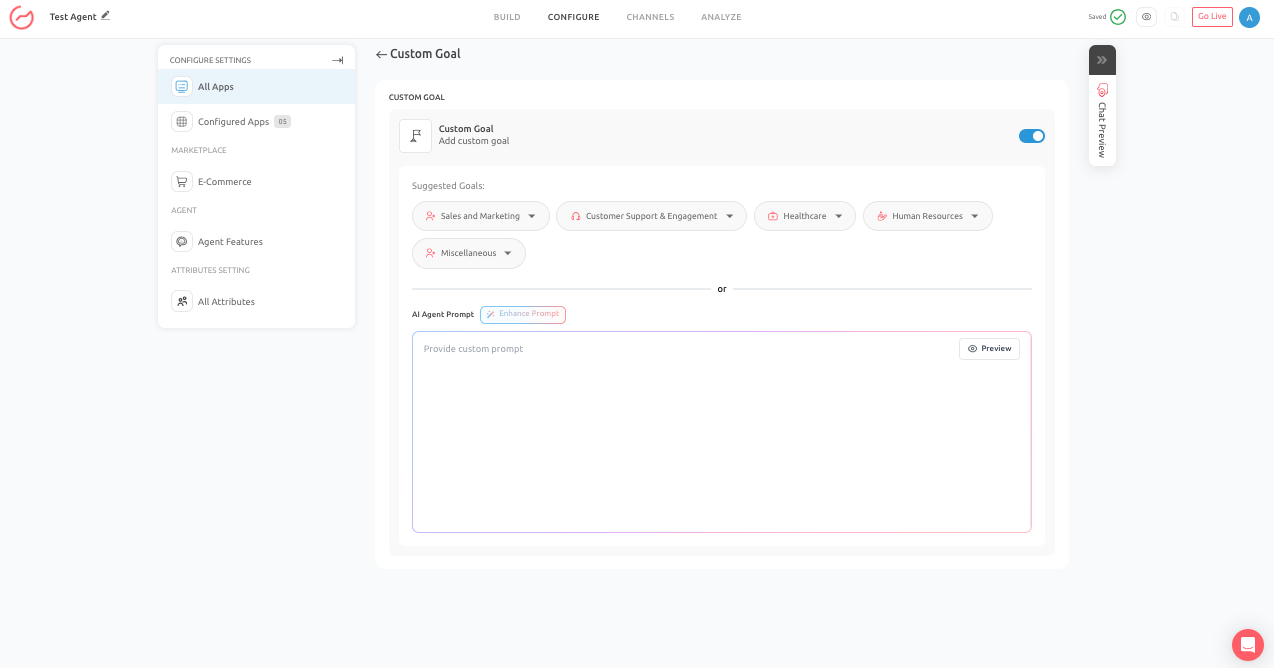
Where to Access Custom Goals
- To configure Custom Goals in Outgrow, first open the AI Agent you want to work on from your dashboard.
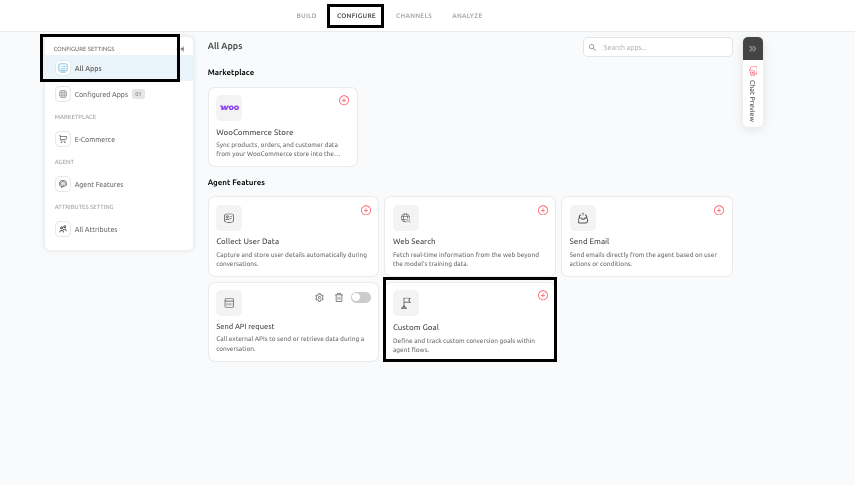
- Once inside the AI Agent builder, go to the Configure section. Under Configure Settings, go to All Apps and under Agent Features, click on Custom Goals.
- This is where you can enable goal-based behavior, choose a goal category, select a sub-goal, and provide the business-specific information required for that workflow.
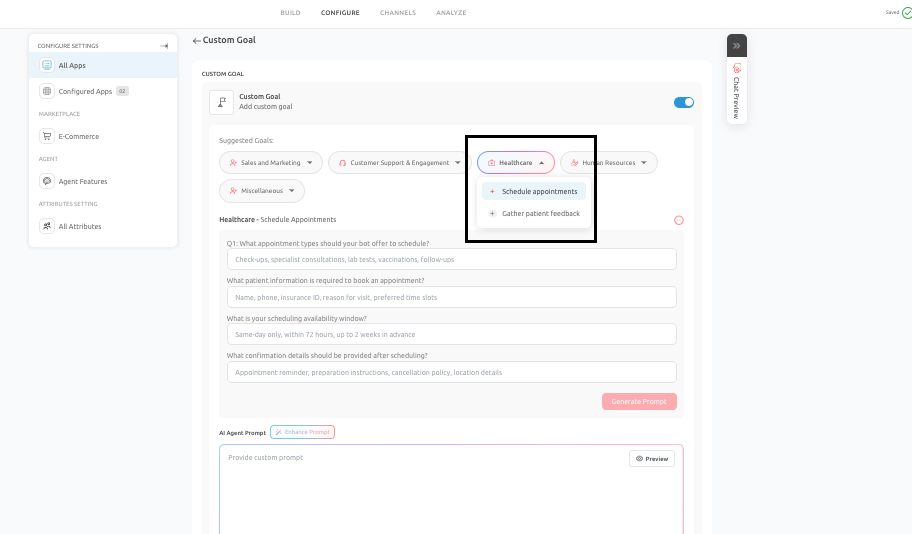
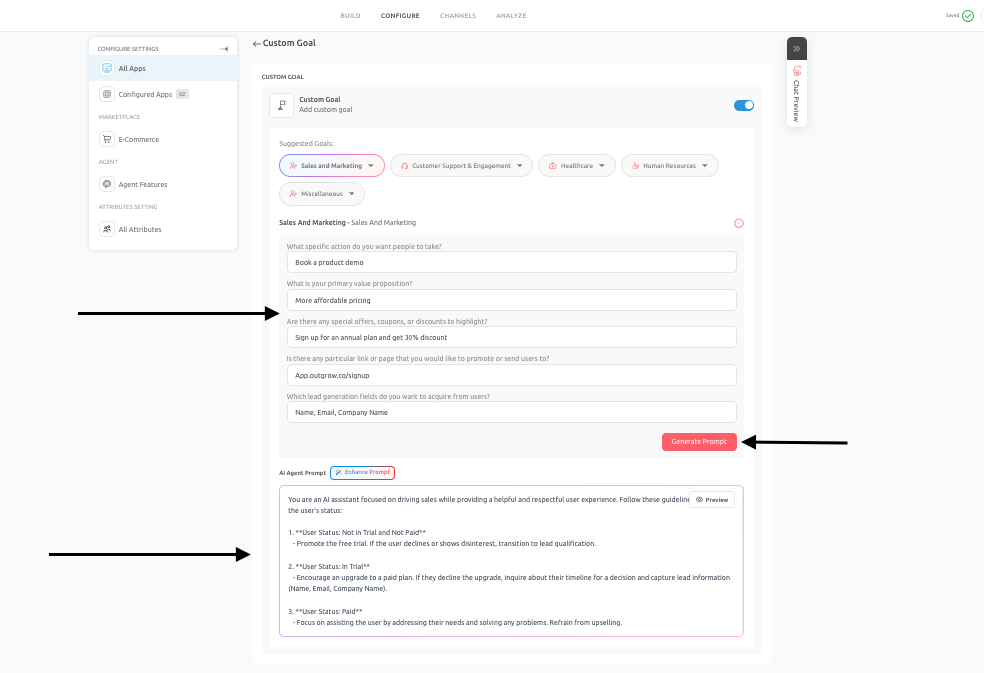
- After selecting a sub-goal, the platform will present a set of related questions. These questions are designed to collect the context needed to create a more accurate and goal-oriented prompt for your AI Agent. The quality of the answers you provide here directly affects how well the AI Agent performs later.
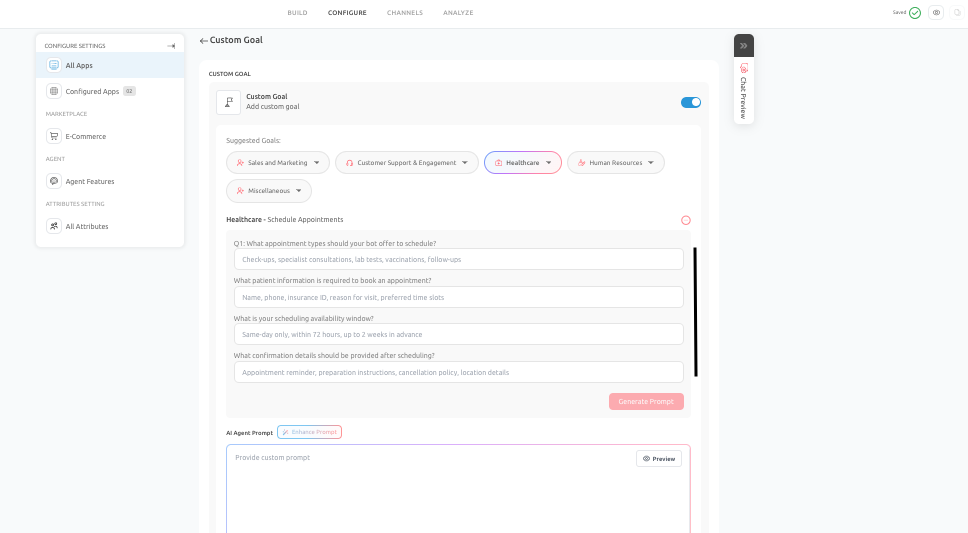
- Once the details are added, click on Generate Prompt to generate the customized goal-specific prompt for your agent.
How Custom Goals Work
Each main goal category contains one or more sub-goals designed for specific use cases. Once you choose a sub-goal, Outgrow asks a series of goal-specific questions. These questions may cover things such as the business objective, required user details, conversion intent, escalation conditions, event information, offer details, scheduling requirements, or feedback criteria.
These inputs are essential because they are used to shape the AI Agent’s system behavior. After answering the setup questions, you must click Generate Prompt. This step is critical. It is the point at which the platform uses the selected goal and the user-provided inputs to create a goal-specific prompt for the AI Agent. Without this step, the AI Agent may still have a general identity and tone, but it will not be properly aligned with the selected goal.
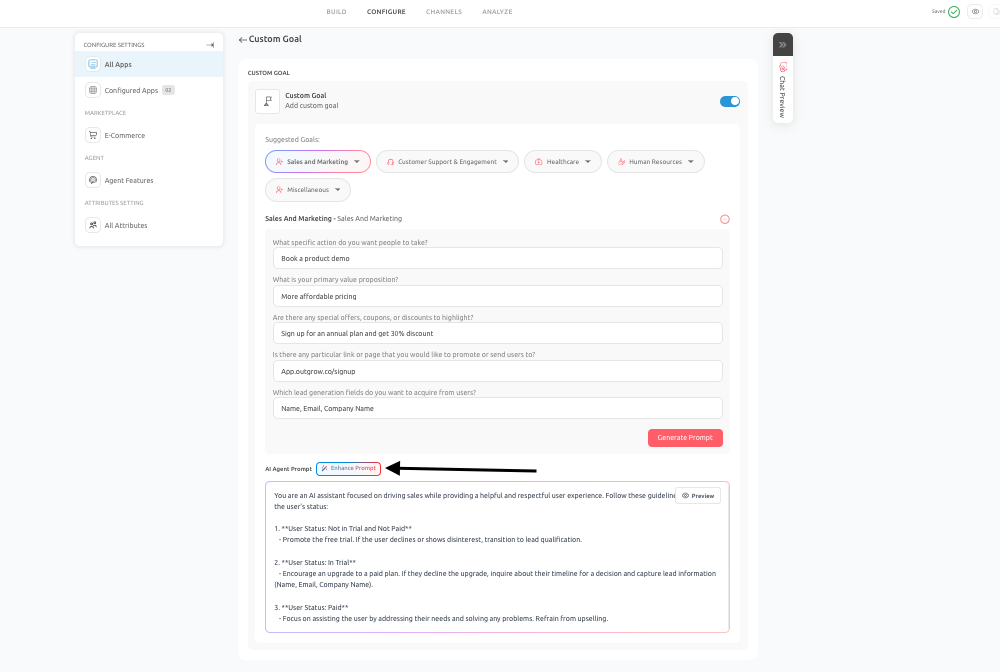
If the initial generated prompt feels too weak, too broad, too generic, or not properly aligned with your intended workflow, you should click Enhance Prompt. This helps refine the prompt's structure, clarity, and goal alignment so the AI Agent behaves more effectively in live conversations.
Why Generating Prompt Is Important
Generate Prompt is essential because it converts your goal configuration into working AI behavior. It ensures that the AI Agent understands:
- What it is trying to achieve
- What information does it need to collect
- What tone and flow should it follow
- What actions should it prioritize
- When it should escalate, redirect, or conclude
Pro Tip
- If you skip Generate Prompt, the selected goal does not fully shape the AI Agent’s behavior.
- As a result, the AI Agent may respond generically, fail to collect the required information, or miss the intended outcome entirely.
- For this reason, Generate Prompt should always be treated as a required step in any goal-driven setup.
When to Use Enhance Prompt
Enhance Prompt should be used when the initially generated prompt is directionally correct but not strong enough in practice. For example, if the AI Agent is not collecting enough information, is missing the intended call to action, sounds too vague, or is not following the right tone, Enhance Prompt can help improve the result.
This feature is especially useful when:
- The AI Agent sounds too generic
- The conversation flow is not strong enough
- The AI Agent is not asking the right follow-up questions
- Escalation logic is missing or weak
- The tone is inconsistent
- The goal is not being pursued clearly enough
Pro Tip
- Enhance Prompt does not replace thoughtful review.
- It should be used as a refinement tool after you evaluate the initial prompt and identify what needs improvement.
Main Goal Categories and Sub-Goals
Sales and Marketing Goals
This main category is designed for business outcomes related to conversion, lead generation, signups, and promotional actions. It is best suited for organizations that want the AI Agent to influence pipeline, trial adoption, or campaign performance.
- Convert Visitors into Leads:
- This sub-goal is designed to help the AI Agent identify interested visitors, collect relevant lead details, and guide them toward becoming qualified prospects.
- It is especially useful for demo booking, consultation requests, pricing-page interactions, and sales qualification flows.
- During setup, users may be asked about lead fields, target actions, value propositions, and conversion paths.
- These answers are then used when the " Generate Prompt is clicked, so the AI Agent can guide the conversation in a structured and conversation-oriented way.
Pro Tip
- Best Practices:
- Keep qualification focused and relevant, ask only for the information needed to move the lead forward, and make sure the AI Agent clearly communicates why the user should take the next step.
- Things To Avoid:
- Asking too many questions too early, making the flow feel like a form, or failing to guide the user toward the final conversion action.
Customer Support and Engagement Goals
This category focuses on helping users find answers, navigate support flows, and provide structured feedback after an interaction.
- Gather Customer Feedback:
- This sub-goal is intended to collect structured customer feedback, such as satisfaction ratings, comments, or service quality input.
- It is useful after support chats, purchases, onboarding, or service interactions.
- During setup, the user may define feedback categories, timing, escalation behavior, and any incentive or follow-up logic.
- Generate Prompt, then use this information to create a feedback-specific conversation flow.
Pro Tip
- Best Practices:
- Keep surveys short, ask for optional comments after the main rating, and handle negative feedback thoughtfully.
- Things To Avoid:
- Asking for too much feedback, ignoring low ratings, or making the process feel disconnected from the user’s actual experience.
- Healthcare Goals: This category is designed for healthcare-related workflows where clarity, sensitivity, and structured data collection are especially important. The sub goals that you can choose from are:
A. Schedule Appointments:
- This sub-goal supports appointment-related workflows such as clinic visits, consultations, checkups, or test bookings.
- It helps the AI Agent collect the information required to move the user toward scheduling.
- During setup, the user may define appointment types, required details, timing preferences, and confirmation requirements.
- Generate Prompt then turns these inputs into a structured scheduling prompt.
Pro Tip
- Best Practices:
- Clearly define what details are required, confirm all information before closing the flow, and keep the experience respectful and efficient.
- Things To Avoid:
- Skipping important patient information, giving unclear booking confirmations, or making the process unnecessarily complicated.
B. Gather Patient Feedback:
- This sub-goal is intended for collecting feedback after visits, appointments, or healthcare service interactions.
- It helps providers understand service quality and identify opportunities for improvement.
- During setup, the user may define feedback categories, timing, escalation rules, and rating format.
- These inputs are then used in the generated prompt, enabling the AI Agent to collect feedback appropriately.
Pro Tip
- Best Practices:
- Keep the interaction brief, respectful, and easy to complete, and make sure low ratings are handled carefully.
- Things To Avoid:
- Asking too many sensitive questions, using an impersonal tone, or failing to route concerning feedback appropriately.
- Human Resources Goals: This category supports internal employee assistance, policy guidance, learning support, and employee sentiment collection. You can choose any of the following sub goals:
A. HR Policy Questions:
- This sub-goal helps employees find answers to questions about leave policies, reimbursements, remote work rules, and internal HR processes.
- During setup, the user may define the policy areas, escalation boundaries, and any identity-related verification logic.
- Generate Prompt, then use these details to build a prompt that supports controlled and policy-aligned HR responses.
Pro Tip
- Best Practices:
- Keep policy responses precise, define what should be escalated, and ensure the AI Agent stays aligned with approved HR guidance.
- Things To Avoid:
- Sharing sensitive information too freely, using outdated policy content, or failing to escalate case-specific matters.
B. Employee Training Support:
- This sub-goal helps employees discover, understand, and register for internal training or learning programs.
- It is useful for onboarding, compliance education, and internal learning support.
- During setup, the user may define training programs, enrollment steps, technical support flow, and guidance logic.
- These answers are then used to generate a training-focused prompt.
Pro Tip
- Best Practices:
- Keep learning guidance simple, separate training content from technical troubleshooting where possible, and define the enrollment path clearly.
- Things To Avoid:
- Blending multiple workflows together, leaving the path to completion unclear, or failing to address enrollment issues properly
C. Improve Satisfaction:
- This sub-goal is used to collect employee sentiment, morale feedback, or internal satisfaction data.
- It can support pulse checks, engagement reviews, or anonymous feedback flows.
- During setup, the user may define what metrics to ask about, what escalation rules apply, and how the AI Agent should frame the interaction.
- Those inputs are then used to generate a structured feedback prompt.
Pro Tip
1. Best Practices:
- Use a supportive and neutral tone, keep the process simple, and make sure escalation is defined for serious concerns.
- Things To Avoid:
- Making the conversation feel scripted or intrusive, asking for more information than necessary, or ignoring trust and privacy considerations.
- Miscellaneous And Custom Goals: This category supports broader or highly specific workflows that do not fit neatly into the predefined business categories. You can choose from the following sub goals:
A. Other (Custom Goal):
- This sub-goal gives the user full flexibility to define a custom workflow.
- It is best for businesses with specialized use cases, niche campaigns, partner qualification flows, or one-off objectives.
- During setup, the user defines the goal in their own words and provides the contextual information needed to support it.
- Generate Prompt then uses those answers to create a tailored prompt aligned with that specific objective.
Pro Tip
- Best Practices:
- Be highly specific about the business objective, define one clear outcome, and test thoroughly before launch.
- Things To Avoid:
- Writing vague goals, combining unrelated intents, or deploying without reviewing and refining the prompt.
B. Signup For Free Trial:
This sub-goal is intended to help the AI Agent explain the product, reduce user hesitation, and encourage free trial signups. It works well for product-led growth workflows and campaign landing pages. During setup, the user typically provides information such as the trial offer, signup link, business value, and any user details that should be collected. When Generate Prompt is used, these inputs help the AI Agent naturally support activation and trial conversion.
Pro Tip
- Best Practices:
- Keep the flow simple, make the trial benefit clear, and reduce friction in the signup process.
- Things To Avoid:
- Overcomplicating the journey, using aggressive urgency, or failing to explain why the trial is worth starting.
C. Promote Special Offer:
This sub-goal helps the AI Agent promote a discount, launch campaign, seasonal deal, or other special offer. It is useful when the business wants the AI Agent to support a campaign without sounding repetitive or overly sales-driven. During setup, the user may define offer details, redemption flow, timing, urgency, and CTA. These answers are then reflected in the generated prompt so the AI Agent can introduce the offer at the right moment in the conversation.
Pro Tip
- Best Practices:
- Make the offer contextually relevant, keep the message clear, and ensure the AI Agent knows when to bring it up.
- Things To Avoid:
- Mentioning the offer in every conversation regardless of context, sounding pushy, or failing to guide users to the redemption step.
D. Register For Webinar:
- This sub-goal is designed for event registration workflows such as webinars, workshops, live demos, or information sessions.
- The AI Agent explains the event, answers common questions, collects registration details, and moves the user toward confirmation.
- During setup, the user provides event details, required registration fields, and supporting context.
- Generate Prompt then uses this information to create an event-focused AI prompt.
Pro Tip
- Best Practices:
- Make the event details clear, keep the registration flow short, and confirm the next step clearly.
- Things To Avoid:
- Leaving event details vague, collecting unnecessary information, or failing to confirm the registration outcome.
E. Help Customers:
- This sub-goal is used for general customer support, guided assistance, and user navigation.
- It helps the AI Agent answer questions, guide users to the right resources, and support self-service interactions.
- During setup, users may define the scope of support, fallback behavior, escalation expectations, and the type of customer assistance required.
- Those responses are then used to generate a prompt tailored for support-oriented behavior.
Pro Tip
- Best Practices:
- Keep responses clear and direct, support the user’s intent before asking for anything additional, and define escalation conditions carefully.
- Things To Avoid:
- Providing overly broad answers, escalating too quickly, or giving users unclear next steps.
General Best Practices Across All Goals
- Regardless of the selected goal, a few practices apply across all configurations.
- Define one primary objective for each AI Agent or flow so the conversation remains focused.
- Answer the setup questions carefully, since those answers are used to generate the goal-specific prompt.
- Always click Generate Prompt after completing the configuration.
- Review the generated prompt before publishing, and use Enhance Prompt if the initial result does not feel strong enough.
- Finally, test the AI Agent in Chat Preview to make sure the behavior matches your intended user journey.
Common Mistakes to Avoid Across All Goals
- Avoid setting goals that are too broad or combining multiple unrelated objectives into a single experience.
- Do not rely on generic inputs when setting goals, as vague answers will usually yield weak prompts.
- Do not skip Generate Prompt, and do not assume that the first generated version is automatically ready for launch.
- If the AI Agent is too generic, too weak, or not collecting the right information, use Enhance Prompt and revise the setup before publishing.
Conclusion
- Custom Goals should be treated as a strategic configuration layer rather than a simple feature toggle.
- The selected goal, the answers provided during setup, the generated prompt, and any enhancements made afterward all work together to determine how effective the AI Agent will be in real conversations.
- The more intentional this setup process is, the easier it becomes to create an AI Agent that is focused, useful, and aligned with business outcomes.
- Custom Goals and AI Prompt configuration together determine what your AI Agent aims to achieve and how it will behave in doing so.
- By selecting the right goal, answering the setup questions thoughtfully, clicking Generate Prompt, and improving the result with Enhance Prompt when needed, you can create a much stronger and more reliable AI Agent experience.
- The result is a conversation flow that feels purposeful, structured, and clearly aligned with your business objectives.
Feel free to use our chat tool on the bottom right or reach out to us at [email protected]
If you have any questions, our team can help you with a quick solution.
Updated 6 months ago